Examples / AI
How do you diagram MCP architecture?
Updated
Agent -> MCP Client -> MCP Server -> |Knowledge Base, Code Sandbox, Memory| for the request and MCP Server -> Agent for the reply. The client is the part inside the agent application that speaks the protocol; the server wraps the thing being called. The bars are a choice, so each animation pass sends the request to one of the three capabilities, and the reply line retraces the route back through the client rather than drawing one long arrow.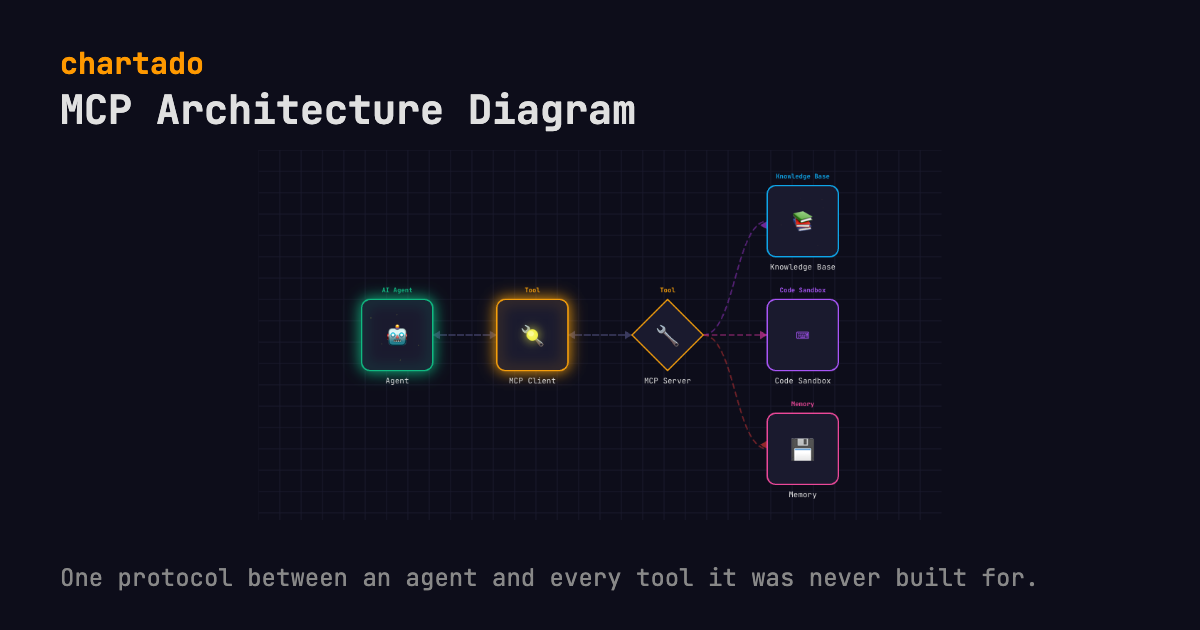
THE TEXT THAT DRAWS IT
Agent -> MCP Client -> MCP Server -> |Knowledge Base, Code Sandbox, Memory|
MCP Server -> Agent
Edit it in the box above and the diagram redraws as you type. Export it as an animated GIF, WebM, WebP or MP4 video, or a still PNG or PDF, every format free. WebM and PNG export here; the rest are in the app after a free sign-up. Every format embeds this text, so the file can be read back into the editor.
WHAT IT SHOWS
An agent with an MCP client does not need bespoke code for each tool it calls. This is the whole reason the protocol exists, and the diagram is shaped by it: the Agent talks to an MCP Client, the client speaks the protocol to an MCP Server, and the server exposes whatever it wraps. Here that is a Knowledge Base, a Code Sandbox and a Memory store.
The bars matter. |Knowledge Base, Code Sandbox, Memory| is a choice, and a choice sends the message down one branch per pass, cycling in the order written, so the Knowledge Base lights on the first pass, the Code Sandbox on the second and Memory on the third. Per turn the agent asks for one capability, and the server does not dispatch to everything it wraps. Braces would draw all three firing at once, which is not what happens.
Line two, MCP Server -> Agent, adds no boxes. Two arrows come out of it, server back to client and client back to agent, in a second flow that starts only after the outbound pass has landed (there is a half-second pause between flows). A still image collapses that into a double-headed arrow. Played, it keeps the order, request out and result back over the same boundary.
That boundary is the point of MCP. Everything left of the server is the agent’s problem and everything right of it belongs to whoever wrote the server. Add a fourth capability inside the bars. Nothing on the left changes.
Now the two limits. Client and server share an icon, because the AI vocabulary matches the word MCP to its Tool icon and has no separate concept for the client side, so the boundary is carried by the layout rather than by the shapes. And a real deployment runs several servers next to each other, while this draws one, because one server is the case to understand first.
Deciding whether to call a tool at all is a different pattern, the ReAct agent, and it has its own page: the model picks between answering and calling, and the tool result comes back for another turn.
QUESTIONS
- What is the difference between an MCP client and an MCP server?
- The client sits inside the agent application and speaks the protocol on the agent’s behalf. The server sits in front of the actual capability (a knowledge base, a sandbox, a memory store) and exposes it in protocol terms. Chartado draws both with the same Tool icon, so the layout is what tells them apart.
- Is MCP specific to one AI vendor?
- No. The Model Context Protocol is an open specification. Any agent with an MCP client can call any MCP server, so the Agent box here can be Claude, ChatGPT or something you built yourself and the picture does not change.
MORE AI PATTERNS
RAG pipeline diagram
The question reaches the vector database before the model is called, and the animation shows it.
User -> Query Agent -> Vector DB -> LLM -> User
Multi-agent router diagram
A router agent in front of three specialist agents, drawn in one column so nobody reads them as a pipeline.
User -> Router Agent -> {Research Agent, Code Agent, Analysis Agent}
ReAct tool-calling diagram
Each turn the model calls a tool or answers, and a tool result goes back to the agent for another turn.
User -> Agent -> LLM -> |Tool, Response|
Human-in-the-loop diagram
A guardrail sends each output to Accepted or to a person, and the person's verdict goes back to the agent.
User -> Agent -> LLM -> Guardrail -> |Accepted, Review|
Also on this site: Serverless REST API diagram, Pub/sub fan-out diagram, Queue worker diagram, Event pipeline diagram and Cloudflare Workers diagram. See all 10 patterns.
Chartado is a text-to-diagram tool: you type lines like A -> B, it draws the architecture and animates the flow.