Examples / AI
How do you diagram a ReAct tool-calling agent?
Updated
User -> Agent -> LLM -> |Tool, Response| is the outbound turn, and the bars mean the model does one of the two per pass, taken in the order written. Tool -> Agent on the second line is the result going back, and the parser draws it as two arrows in reverse over the route the message came out on, Tool to LLM and LLM to Agent, as a second flow that starts half a second after the first pass ends.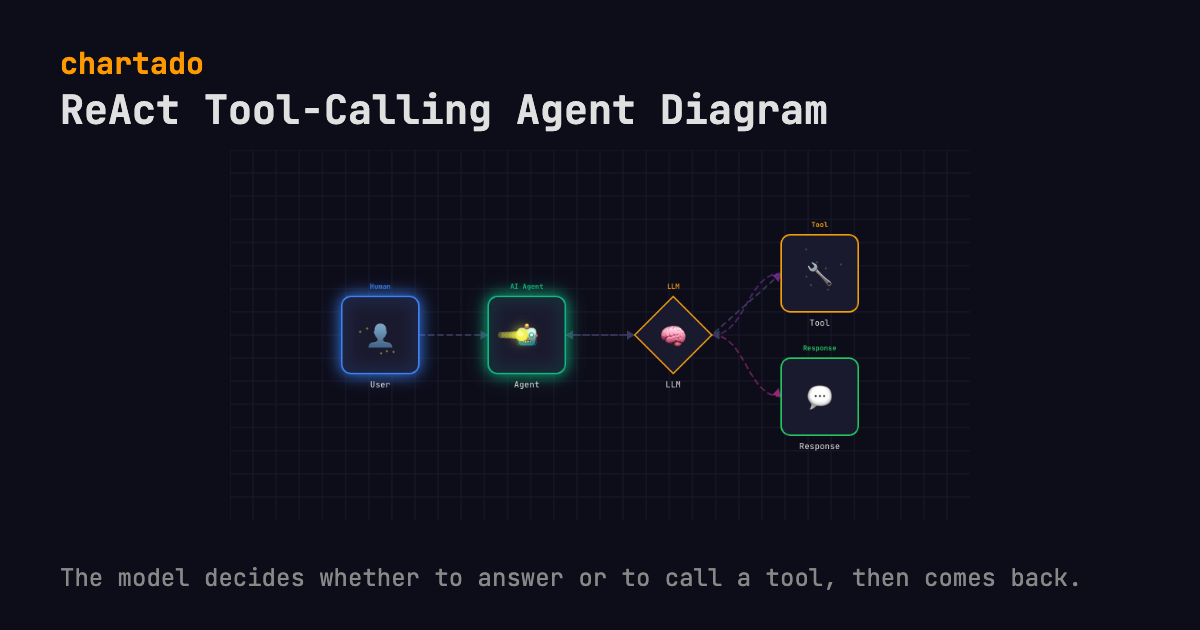
THE TEXT THAT DRAWS IT
User -> Agent -> LLM -> |Tool, Response|
Tool -> Agent
Edit it in the box above and the diagram redraws as you type. Export it as an animated GIF, WebM, WebP or MP4 video, or a still PNG or PDF, every format free. WebM and PNG export here; the rest are in the app after a free sign-up. Every format embeds this text, so the file can be read back into the editor.
WHAT IT SHOWS
Two lines of text, and the second one is the interesting one.
Line one is the ordinary chain. A request goes from the user to the Agent, the agent hands it to the LLM, and the model comes back with one of two things: a Response to pass on, or a Tool it wants run. The bars in |Tool, Response| say one of these per turn. Braces, { }, would say both at once, which is a fan-out rather than a decision. I think that single character is the easiest thing to get wrong in an agent diagram, because a fan-out looks fine on a slide and describes a system that runs every tool on every turn.
Each pass takes one branch, in written order. Tool on the first pass, Response on the second, Tool again on the third.
Then Tool -> Agent. This does not draw a long arrow flying back over the diagram. Instead, the parser looks up the route the message took to reach the tool, Agent to LLM to Tool, and plays it in reverse as a second flow: Tool back to LLM, then LLM back to Agent, one hop at a time, starting half a second after the outbound pass has finished. That matches the real loop, where a tool result goes into the next model call rather than straight to the agent’s output.
Five names, and none of them falls back to the generic icon. User resolves to the Human icon, and Agent, LLM, Tool and Response each get their own.
QUESTIONS
- Why model tool-or-answer as a choice instead of a broadcast?
- Because on any one step the model does one or the other. Braces would send the message to Tool and Response in the same pass, which draws an agent that calls a tool and answers at the same time, and no ReAct loop does that. The bars make each pass pick one, so the animation looks like successive turns.
- How does the loop back to the agent work in the DSL?
Tool -> Agentis its own line and adds no boxes. The parser finds the forward route (Agent to LLM to Tool), plays it backwards hop by hop as a second flow, and only starts that flow once every message of the first one has arrived, so the result visibly passes back through the LLM box before the next pass begins.
MORE AI PATTERNS
RAG pipeline diagram
The question reaches the vector database before the model is called, and the animation shows it.
User -> Query Agent -> Vector DB -> LLM -> User
Multi-agent router diagram
A router agent in front of three specialist agents, drawn in one column so nobody reads them as a pipeline.
User -> Router Agent -> {Research Agent, Code Agent, Analysis Agent}
Human-in-the-loop diagram
A guardrail sends each output to Accepted or to a person, and the person's verdict goes back to the agent.
User -> Agent -> LLM -> Guardrail -> |Accepted, Review|
MCP architecture diagram
The agent talks to its MCP client and nothing else; the tools sit behind the server.
Agent -> MCP Client -> MCP Server -> |Knowledge Base, Code Sandbox, Memory|
Also on this site: Serverless REST API diagram, Pub/sub fan-out diagram, Queue worker diagram, Event pipeline diagram and Cloudflare Workers diagram. See all 10 patterns.
Chartado is a text-to-diagram tool: you type lines like A -> B, it draws the architecture and animates the flow.